
Six Ways to Control an ALC-4096 Display
Not every display application is controlled the same way.
A display mounted inside medical equipment may be configured once using local buttons. A digital signage player may adjust settings through DDC/CI. An industrial system might use RS-232 commands, while a remote deployment may require Ethernet-based control across a network.
The ALC-4096 supports all of these approaches.
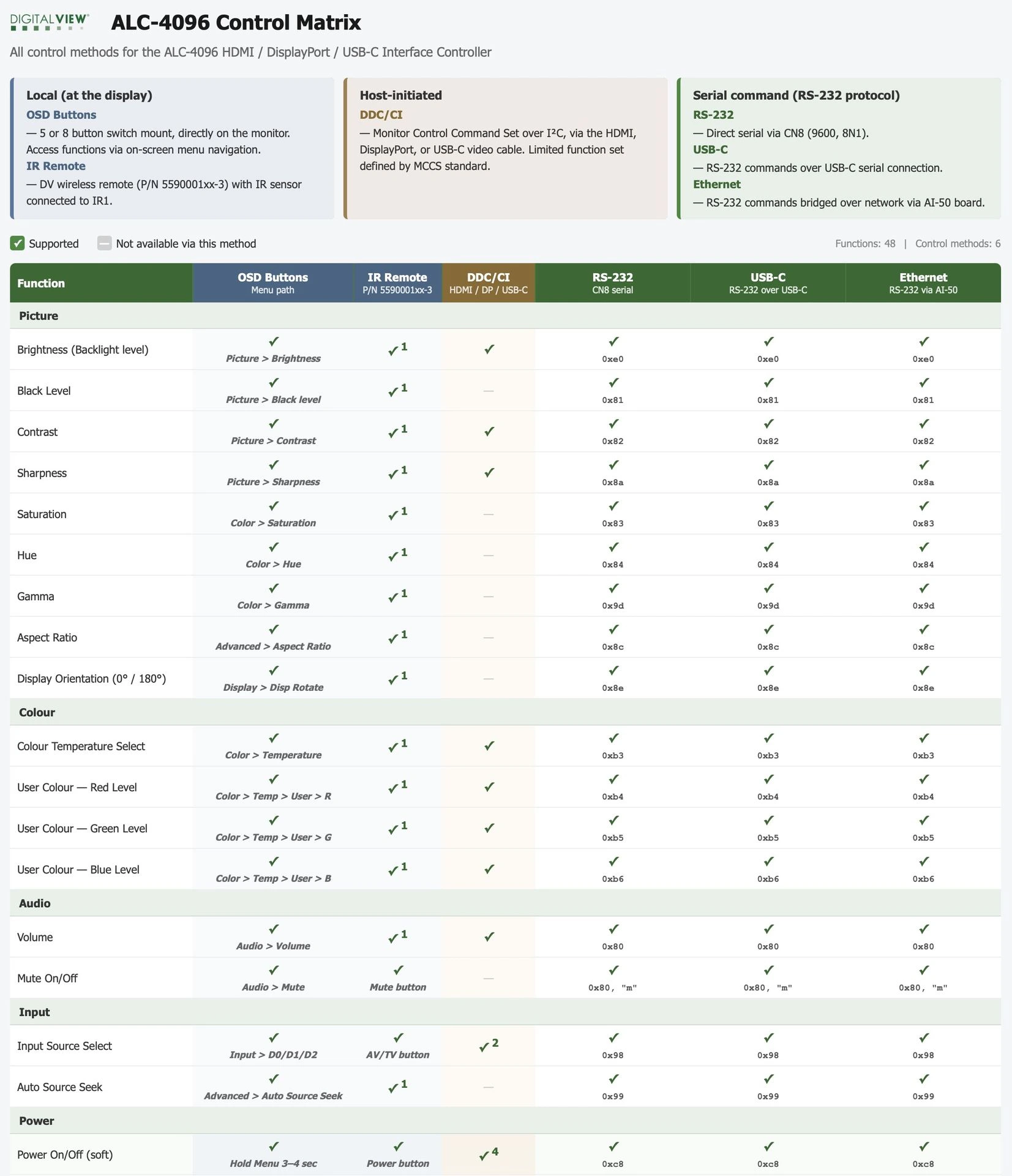
To help customers understand what is possible, we’ve published a new ALC-4096 Control Matrix that maps every function against every available control method.
- HTML version: this file will open in any browser and provide a single-page view.
- The PDF version as a printable reference.
Local Control
For standalone systems, users can access display settings through the on-screen display menu using either the switch mount or IR remote control. Brightness, contrast, color settings, input selection, and many other functions are available without connecting a host system.
DDC/CI Control
Many applications already have a host PC connected to the display. In these cases, DDC/CI can provide a simple way to adjust key monitor settings directly via the video connection, eliminating the need for a separate control cable. Functions such as brightness, contrast, color temperature, volume, input selection, and power control can be managed directly from software.
RS-232 Control
When deeper control is required, RS-232 provides access to the complete command set. Integrators can configure display behavior, manage EDID settings, monitor operating status, read temperatures, adjust backlight parameters, and perform diagnostics. All 48 documented functions are available through the serial command interface.
USB-C Serial
Many modern systems no longer include traditional serial ports. The ALC-4096 addresses this by supporting the same command set through USB-C, appearing as a virtual serial port to the host system. This allows developers to use familiar RS-232 commands without additional hardware.
Ethernet Control
For remote installations, the AI-50 interface extends RS-232 control over Ethernet. This enables displays to be monitored and controlled across a network, opening opportunities for centralized management, diagnostics, and support.
Finding the Best Control Method
Different projects have different requirements. Some need simple brightness adjustment. Others require complete remote management and monitoring. Here is a table with some suggestions:
|
Application Scenario |
Suggested Control Method |
Why It Fits |
|---|---|---|
|
Desktop workstation with a connected PC |
DDC/CI |
Adjust brightness, contrast, volume, input source, and power directly through the video cable without additional wiring. |
|
Digital signage player |
DDC/CI or RS-232 |
Automate display settings, input selection, and power management as part of the signage software. |
|
Industrial equipment |
RS-232 |
Provides access to the complete command set for reliable integration with embedded controllers and PLCs. |
|
Medical devices |
RS-232 |
Enables controlled configuration, status monitoring, and integration into the device’s software environment. |
|
Transportation displays |
RS-232 or Ethernet |
Supports centralized management and diagnostics across multiple displays. |
|
Kiosks and self-service terminals |
RS-232 |
Allows software-controlled operation while preventing user access to display settings. |
|
USB-C connected systems |
USB-C Serial |
Provides the full RS-232 command set through a virtual COM port without requiring a dedicated serial connector. |
|
Network-connected display deployments |
Ethernet (AI-50) |
Enables remote monitoring, control, troubleshooting, and configuration over the network. |
|
Outdoor or variable-light installations |
RS-232 with Light Sensor functions |
Configure automatic brightness adjustment based on ambient light conditions. |
|
Preventing user tampering |
RS-232 |
Lock OSD controls, disable switch access, and manage settings remotely. |
|
Remote diagnostics and support |
RS-232, USB-C, or Ethernet |
Query input status, resolution, temperature, firmware version, runtime hours, and other operational parameters. |
|
OEM display products |
Any method as appropriate |
Multiple control options allow the same controller platform to be used across different product designs and customer requirements. |
The ALC-4096 Control Matrix downloads below provide a quick reference showing which functions are available through each control method, helping engineers and integrators select the most suitable approach for their application.
Here is an example of an on-screen UI making use of both a touchscreen and RS-232.
Download:
- HTML version: this file will open in any browser and provide a single-page view.
- The PDF version as a printable reference.
An example of the table...
Next Steps
- Visit the ALC-4096 product web page
- All Digital View LCD controllers support a broad set of functions and RS-232 commands; see the Controller Summary for a list of our controller board models.
- Contact us for more information or custom engineering